> ## Documentation Index
> Fetch the complete documentation index at: https://docs-staging.incredibuild.com/llms.txt
> Use this file to discover all available pages before exploring further.
# Build Group API
Last updated on Mar 08, 2023
Every API call must include a header with a key called **client-api-key** and the value of your [API key](/windows/10.2.2/api-keys). All APIs are case sensitive.
The following are descriptions of items in the API's calls below:
* **Coordinator IP Address/Hostname** – the IP address or hostname of the Coordinator.
* **Coordinator UI Port** – the port number you defined during installation. By default, this is 8000.
* **Version** - the version of our API. Currently there is only one version: 1.0.0.
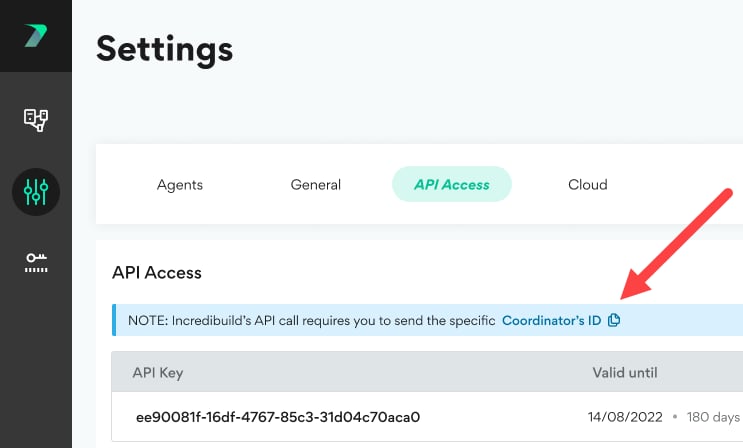
* **Coordinator ID** - The ID assigned by Incredibuild to your Coordinator. You can view this in the **Coordinator Manager** > **Settings** > **API Access** area.
 Returns a list of all Build Groups in a specific Coordinator.
**Request Syntax**
```
GET https://{Coordinator IP Address/Hostname}:{Web Access Port}/api/build-groups?coordinatorId={coordinatorId}&version=1.0.0
```
**Example request:**
```
GET https://coordinatorPc:8000/api/build-groups?coordinatorId=00000000-0000-0000-0000-000000000000&version=1.0.0
```
**Example Response**
[Copy](javascript:void\(0\);)
```
[
{
"group": "Default",
"agentCount": 1
},
{
"group": "QA-2",
"agentCount": 6
},
{
"group": "QA-3",
"agentCount": 4
}
]
```
Return a list of all the Agents in a specific Build Group.
**Request Syntax**
```
GET https://{Coordinator IP Address/Hostname}:{Web Access Port}/api/build-groups/{build group name}/agents?coordinatorId={coordinatorId}&version=1.0.0
```
**Example Request:**
```
GET https://coordinatorPc:8000/api/build-groups/dev-group/agents?coordinatorId=00000000-0000-0000-0000-000000000000&version=1.0.0
```
**Example Response**
[Copy](javascript:void\(0\);)
```
[
{
"name": "AgentSmith",
"ip": "127.0.0.1"
},
{
"name": "AgentBill",
"ip": "127.0.0.2",
}
]
```
Returns the details of one or more Agents. For more information about what these agent details mean, see [Viewing Agents](/windows/10.2.2/coordinator-agents-list#View).
**Request Syntax**
```
GET https://{Coordinator IP Address/Hostname}:{Web Access Port}/api/agents?coordinatorId={coordinatorId}&version=1.0.0&agents=[{agent name1},{agent name2}]
```
**Example Request:**
```
GET https://coordinatorPc:8000/api/agents?agents=[AgentSmith,NeoHelper,SpoonHelper]&coordinatorId=00000000-0000-0000-0000-000000000000&version=1.0.0
```
**Example Response**
[Copy](javascript:void\(0\);)
```
{
"agentsInRequest": 3,
"agentsInResults": 2,
"agentsNotFound": 1,
"agentsDetails": [
{
"name": "AgentSmith",
"id": " AgentSmith ",
"buildGroup": "dev-group",
"ip": "127.0.0.1",
"status": "Ready"
},
{
"name": "NeoHelper",
"id": " NeoHelper",
"buildGroup": "devops",
"ip": "100.6.6.6",
"status": "Ready"
}
]
}
```
Assign one or more Agents to an existing Build Group. You cannot perform the Agent Assignment action if one of the Agents is participating in a build or is offline.
**Request Syntax (with example agents)**
[Copy](javascript:void\(0\);)
```
POST https://{Coordinator IP Address/Hostname}:{Web Access Port}/api/build-groups/{build group name}/agents/add?coordinatorId={coordinatorId}&version=1.0.0
{
"agents": ["YAIRMAYER8DBB", "test"]
}
```
**Example Request:**
[Copy](javascript:void\(0\);)
```
POST https://coordinatorPc:8000/api/build-groups/cool-guys/agents?coordinatorId=00000000-0000-0000-0000-000000000000&version=1.0.0
{
"agents": ["AgentJay", "AgentBob","AgentDante"]
}
```
**Example Response:**
[Copy](javascript:void\(0\);)
```
[
{
"agentName": "AgentJay",
"status": "OK"
},
{
"agentName": "AgentBob",
"status": "OK"
},
{
"agentName": "AgentDante",
"status": "fail",
"message": "Agent not found"
}
]
```
Removes all Agents from a specified Build Group. The Agents are reassigned to the **Default** Build Group.
If an Agent is offline, the Clear action may appear to complete successfully, but the offline Agent remains in the original Build Group.
**Request Syntax**
[Copy](javascript:void\(0\);)
```
POST https://{Coordinator IP Address/Hostname}:{Web Access Port}/api/build-groups/{group}/clear?coordinatorId={coordinatorId}&version=1.0.0
{
}
```
**Example Request:**
[Copy](javascript:void\(0\);)
```
POST https://{Coordinator IP Address/Hostname}:{Web Access Port}/api/build-groups/Dev/clear?coordinatorId={coordinatorId}&version=1.0.0
{
}
```
**Example Response:**
[Copy](javascript:void\(0\);)
```
{
"clearedGroupName": "Dev",
"agentsAffected": 2
}
```
Removes the Agents you specify from whatever build groups they are assigned to. They are the reassigned to the **Default** Build Group.
You cannot perform the Clear action, if one or more Agents in the specified Build Group are currently participating in a build or is offline. If an Agent is offline, the Clear action may appears to complete successfully, but the offline Agent remains in the original Build Group.
**Request Syntax**
[Copy](javascript:void\(0\);)
```
POST https://{Coordinator IP Address/Hostname}:{Web Access Port}/api/build-groups/agents/clear?coordinatorId={coordinatorId}&version=1.0.0
{
"agents": ["agentname1", "agentname2"]
}
```
**Example Request:**
[Copy](javascript:void\(0\);)
```
POST https://{Coordinator IP Address/Hostname}:{Web Access Port}/api/build-groups/agents/clear?coordinatorId={coordinatorId}&version=1.0.0
{
"agents": ["desktop123", "desktop248"]
}
```
**Example Response:**
[Copy](javascript:void\(0\);)
```
[
{
"agentName": "desktop123",
"status": "OK"
},
{
"agentName": "desktop248",
"status": "OK"
},
]
```
[https://docs.incredibuild.com/Default.htm](https://docs.incredibuild.com/Default.htm)
[https://docs.incredibuild.com/lin/latest/Default.htm](https://docs.incredibuild.com/lin/latest/Default.htm)
[https://docs.incredibuild.com/win/v10\_2\_2/Default.htm](https://docs.incredibuild.com/win/v10_2_2/Default.htm)
[https://docs.incredibuild.com/cloud/Default.htm](https://docs.incredibuild.com/cloud/Default.htm)
Windowshttps\://[www.incredibuild.com/](http://www.incredibuild.com/) 10.2.2
Returns a list of all Build Groups in a specific Coordinator.
**Request Syntax**
```
GET https://{Coordinator IP Address/Hostname}:{Web Access Port}/api/build-groups?coordinatorId={coordinatorId}&version=1.0.0
```
**Example request:**
```
GET https://coordinatorPc:8000/api/build-groups?coordinatorId=00000000-0000-0000-0000-000000000000&version=1.0.0
```
**Example Response**
[Copy](javascript:void\(0\);)
```
[
{
"group": "Default",
"agentCount": 1
},
{
"group": "QA-2",
"agentCount": 6
},
{
"group": "QA-3",
"agentCount": 4
}
]
```
Return a list of all the Agents in a specific Build Group.
**Request Syntax**
```
GET https://{Coordinator IP Address/Hostname}:{Web Access Port}/api/build-groups/{build group name}/agents?coordinatorId={coordinatorId}&version=1.0.0
```
**Example Request:**
```
GET https://coordinatorPc:8000/api/build-groups/dev-group/agents?coordinatorId=00000000-0000-0000-0000-000000000000&version=1.0.0
```
**Example Response**
[Copy](javascript:void\(0\);)
```
[
{
"name": "AgentSmith",
"ip": "127.0.0.1"
},
{
"name": "AgentBill",
"ip": "127.0.0.2",
}
]
```
Returns the details of one or more Agents. For more information about what these agent details mean, see [Viewing Agents](/windows/10.2.2/coordinator-agents-list#View).
**Request Syntax**
```
GET https://{Coordinator IP Address/Hostname}:{Web Access Port}/api/agents?coordinatorId={coordinatorId}&version=1.0.0&agents=[{agent name1},{agent name2}]
```
**Example Request:**
```
GET https://coordinatorPc:8000/api/agents?agents=[AgentSmith,NeoHelper,SpoonHelper]&coordinatorId=00000000-0000-0000-0000-000000000000&version=1.0.0
```
**Example Response**
[Copy](javascript:void\(0\);)
```
{
"agentsInRequest": 3,
"agentsInResults": 2,
"agentsNotFound": 1,
"agentsDetails": [
{
"name": "AgentSmith",
"id": " AgentSmith ",
"buildGroup": "dev-group",
"ip": "127.0.0.1",
"status": "Ready"
},
{
"name": "NeoHelper",
"id": " NeoHelper",
"buildGroup": "devops",
"ip": "100.6.6.6",
"status": "Ready"
}
]
}
```
Assign one or more Agents to an existing Build Group. You cannot perform the Agent Assignment action if one of the Agents is participating in a build or is offline.
**Request Syntax (with example agents)**
[Copy](javascript:void\(0\);)
```
POST https://{Coordinator IP Address/Hostname}:{Web Access Port}/api/build-groups/{build group name}/agents/add?coordinatorId={coordinatorId}&version=1.0.0
{
"agents": ["YAIRMAYER8DBB", "test"]
}
```
**Example Request:**
[Copy](javascript:void\(0\);)
```
POST https://coordinatorPc:8000/api/build-groups/cool-guys/agents?coordinatorId=00000000-0000-0000-0000-000000000000&version=1.0.0
{
"agents": ["AgentJay", "AgentBob","AgentDante"]
}
```
**Example Response:**
[Copy](javascript:void\(0\);)
```
[
{
"agentName": "AgentJay",
"status": "OK"
},
{
"agentName": "AgentBob",
"status": "OK"
},
{
"agentName": "AgentDante",
"status": "fail",
"message": "Agent not found"
}
]
```
Removes all Agents from a specified Build Group. The Agents are reassigned to the **Default** Build Group.
If an Agent is offline, the Clear action may appear to complete successfully, but the offline Agent remains in the original Build Group.
**Request Syntax**
[Copy](javascript:void\(0\);)
```
POST https://{Coordinator IP Address/Hostname}:{Web Access Port}/api/build-groups/{group}/clear?coordinatorId={coordinatorId}&version=1.0.0
{
}
```
**Example Request:**
[Copy](javascript:void\(0\);)
```
POST https://{Coordinator IP Address/Hostname}:{Web Access Port}/api/build-groups/Dev/clear?coordinatorId={coordinatorId}&version=1.0.0
{
}
```
**Example Response:**
[Copy](javascript:void\(0\);)
```
{
"clearedGroupName": "Dev",
"agentsAffected": 2
}
```
Removes the Agents you specify from whatever build groups they are assigned to. They are the reassigned to the **Default** Build Group.
You cannot perform the Clear action, if one or more Agents in the specified Build Group are currently participating in a build or is offline. If an Agent is offline, the Clear action may appears to complete successfully, but the offline Agent remains in the original Build Group.
**Request Syntax**
[Copy](javascript:void\(0\);)
```
POST https://{Coordinator IP Address/Hostname}:{Web Access Port}/api/build-groups/agents/clear?coordinatorId={coordinatorId}&version=1.0.0
{
"agents": ["agentname1", "agentname2"]
}
```
**Example Request:**
[Copy](javascript:void\(0\);)
```
POST https://{Coordinator IP Address/Hostname}:{Web Access Port}/api/build-groups/agents/clear?coordinatorId={coordinatorId}&version=1.0.0
{
"agents": ["desktop123", "desktop248"]
}
```
**Example Response:**
[Copy](javascript:void\(0\);)
```
[
{
"agentName": "desktop123",
"status": "OK"
},
{
"agentName": "desktop248",
"status": "OK"
},
]
```
[https://docs.incredibuild.com/Default.htm](https://docs.incredibuild.com/Default.htm)
[https://docs.incredibuild.com/lin/latest/Default.htm](https://docs.incredibuild.com/lin/latest/Default.htm)
[https://docs.incredibuild.com/win/v10\_2\_2/Default.htm](https://docs.incredibuild.com/win/v10_2_2/Default.htm)
[https://docs.incredibuild.com/cloud/Default.htm](https://docs.incredibuild.com/cloud/Default.htm)
Windowshttps\://[www.incredibuild.com/](http://www.incredibuild.com/) 10.2.2